How to Fix a Zipper
You can often fix a stuck or broken zipper at home. You need basic tools and a little patience. That saves you from replacing a garment that is otherwise good.
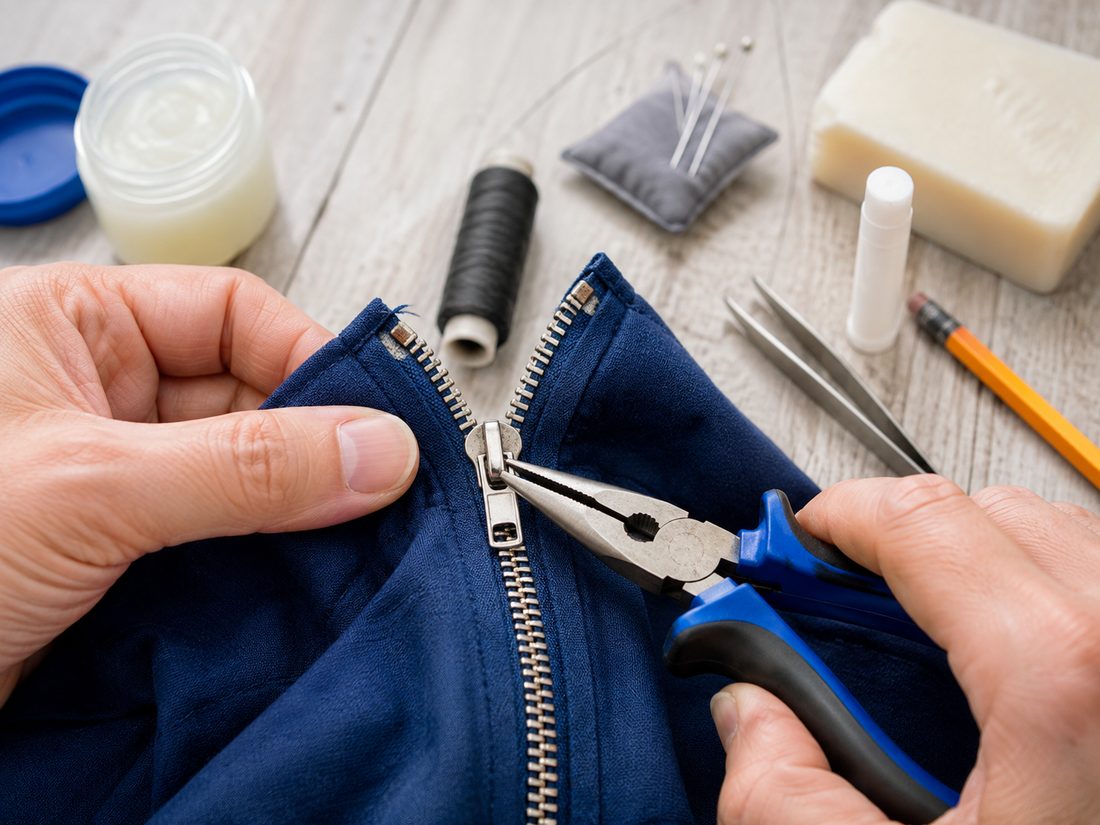
Tools
- Needle-nosed pliers
- Lubricant (petroleum jelly, WD-40, graphite pencil, or a bar of soap)
- Sewing needle and heavy thread (optional, How to Sew a New Zipper Thread Stop
- Thread the needle with heavy thread Double a length of heavy thread through the needle and tie the ends together in a knot, so you're sewing with a doubled, stronger strand.
- Mark exactly where the stop belongs Close the zipper (or position the slider where you want it to stop) and find the spot right at the edge of the teeth where the old metal or plastic stop used to sit.
- Wrap the thread around both rows of teeth Working right at that spot, wrap the thread tightly around both rows of teeth through the tape, pulling each pass snug, until the wrapped thread is slightly thicker than the teeth themselves - that thickness is what physically blocks the slider.
- Knot off and trim Finish with a couple of small stitches through the wraps to lock them in place, tie off, and trim the excess thread close to the knot.
- Cotton swab
- Tweezers (optional, for removing caught thread)
Steps
Clear the obstruction
Before you try anything else, look at the zipper in good light. Check the teeth and the slider for dirt, grit, or caught fabric and thread. The slider is the part you pull to open and close the zipper. Hold the slider still. Gently pull any caught fabric or thread away. Use tweezers for small threads. This alone fixes many stuck zippers, with no other repair needed.
Apply a lubricant
Is nothing caught, but the zipper is still stuck? Then add a lubricant. A lubricant is something slippery that helps the slider move. Graphite from a No. 2 pencil works. So does a bar of soap or petroleum jelly. Put it straight onto the teeth with a cotton swab. Wipe away any extra.
Straighten bent teeth
Look for bent teeth. Straighten each one with pliers by pulling it straight. Be careful not to pull it out of the tape. The tape is the fabric strip that holds the teeth.
- Know your zipper type before you reach for the pliers. Most zippers are built in one of three ways. Some have metal teeth clamped onto the tape. Some have molded plastic teeth, such as YKK's VISLON. Some have one long nylon coil instead of separate teeth. You can only straighten metal teeth. They are separate pieces, so they bend back into place. Molded plastic teeth are more likely to crack than bend. A coil zipper has no separate teeth to straighten at all. Do you end up replacing the slider in steps 7 and 8? Then How to Find and Match Your Zipper's Size
- Check the slider for a stamped number Flip the pull tab up and look at the back or underside of the slider body - most sliders have a size number stamped there. It's often faint; wiping it with a cotton swab can help it stand out.
- Measure the teeth if nothing's stamped Close the zipper and measure the width of the closed row of teeth in millimeters. That figure is roughly the size - about 5mm means a #5, about 8mm means a #8.
- Note the construction alongside the size A #5 coil slider won't run on #5 molded-plastic teeth, so bring both facts - construction and size - when shopping for a replacement.
- Check locking style and pull count too Sliders of the right size and construction can still differ in whether they lock in place and whether they take one pull or two - match those as well so the replacement behaves like the original.
Tighten a loose slider
Sometimes the zipper closes, but the teeth pop open again just behind the slider. That usually means the slider is worn loose, not broken. Try . Make small adjustments. Test the zipper as you go. Do this before you decide you need a whole new slider.
- How to Tighten a Loose Zipper Slider
- Confirm the slider is the problem Zip it closed and check whether the teeth engage normally but separate again immediately behind the slider. If teeth are missing, cracked, or badly damaged, tightening the slider won't fix them.
- Squeeze the slider very slightly With the zipper open, use needle-nosed pliers to gently compress one side of the slider where its top and bottom plates meet. Make only a tiny adjustment.
- Adjust the other side evenly Apply the same small amount of pressure to the opposite side so the slider stays aligned rather than becoming pinched or crooked.
- Test before squeezing again Run the slider up and down and check whether the zipper stays closed. Repeat only in tiny increments; over-compressing the slider can make it bind or permanently deform it.
Remove the bottom stop
Has the zipper come apart below the slider? If squeezing the slider gently does not fix it, take off the bottom stop first. The bottom stop is the small metal or plastic band at the base of the teeth. Grip it with pliers and pry it off.
Reattach the slider and stop
. Then move the slider up towards the top. Close as many teeth as you can. Now fix the metal zipper stop back on with pliers. If the original stop was plastic, sew a new thread stop instead.
- How to Feed Both Rows of Teeth Back Into the Slider
- Square up the tape ends With the bottom stop removed, line up the two tape ends evenly and check that the lowest few teeth on each side are intact and not bent - a single damaged tooth at the entry point will block the slider every time.
- Start one side into its channel Hold the slider with the wide end facing the tape ends. Work the first row of teeth into one channel and push until it emerges past the top of the slider, then pinch that tape above the slider to keep it from sliding back out.
- Feed the second side in while keeping tension Guide the other row into the opposite channel, keeping both tapes pulled taut and flat. If the second side won't enter, back the slider down a tooth or two and re-seat rather than forcing it.
- Work the slider up slowly and check the mesh Move it a short distance and confirm the teeth are interlocking evenly behind it. If they're separating, the two sides started offset by one tooth - slide back down and restart the previous step.
Remove the top stops
Did none of the earlier fixes solve the problem? If the slider still keeps failing, remove the top stops. The top stops sit at the top of the teeth and keep the slider from coming off. Then look at the slider from the side. Check for an uneven gap between its top and bottom plates.
Fix or replace the slider
Straighten a bent slider with pliers. If you cannot fix it, slide it off. Then put on a new slider of the correct size.
Reattach the top stops and test
Crimp new top stops onto the tape with pliers. You can sew a new thread stop instead. Then test the zipper. It should open and close smoothly. Only then is the repair complete.
Tips
- Choosing a lubricant. Graphite and soap are safer around fabric than oil-based lubricants. Even so, graphite can leave a faint mark on light-colored material. WD-40 stains more easily. Keep it for metal zippers away from clothing.
Sources
Each step in this guide is drawn from facts stated by several of these pages independently. Sources that did not corroborate anything used here are not listed.
- How to Fix a Zipper When Broken, Stuck, or Separated thespruce.com
- How to Fix a Zipper: Repair Stuck, Broken, or Separated Zippers build-construct.com
- Zipper Repair: Fix Any Zipper Issue at Home everydaycleaningtips.com
- How to Fix a Zipper: 11 Ways to Fix Broken or Stuck Zippers familyhandyman.com
- How to repair a ZIPPER : 10 zip problems & solutions for fixing them sewguide.com
Leave a comment
Comments are reviewed before appearing. See our Privacy Policy for how your name and message are handled.
Comments
No comments yet.